Loading
Showing posts with label HD2 Hacks. Show all posts

Friday, January 27, 2012

HTC HD2 Apps: Android CM7.2 v2.3.7 Gingerbread SD on HD2


This is the latest version  (January-19-2012)  of Android Gingerbread v2.3.7 for your HD2.
This is by far the best build I have found for the Android on HD2.

This is a SD build not a NAND build (NAND versions replaces WM, SD versions DO NOT replace WM)

This build has everything working!

Working:
  • 3G / Data
  • Audio
  • Bluetooth
  • Wi-Fi
  • 720p PLAYBACK
  • Phone
  • Camera
  • Camcorder (HD !!!)
  • GPS
  • USB Disk
CyanogenMod 7 (CM7) builds are Fast, stable, and offer perfect support for RTL (right to left) languages (like Arabic or Hebrew)

Developer's Page (if you need more help):

Requirements:
- HSPL installed (see step 1 HERE)
- Radio version 2.08 or higher (2.12.50.02_2 recommended) (see step 2 HERE)

Install Instructions:

After installing HSPL and upgrading your radio version (see Requirements).
Copy the Android folder to your SD card .
(should look like this: storage card/Android).
Option 1 (recommended): Install this Android Launcher on WM, set it to "Auto start" and to "3 seconds", and soft reset to start Android.
Option 2: Go to the android folder on the storage card.
Click on the "CLRCAD.EXE" file, ( you will get no action on the screen but it is normal).
Click the "HARET.EXE" file to launch Android!

First boot always takes a long time (about 10 minutes) be patient, it will work, and future boots do not take as long.

After you load Android for the first time  reboot after 10 minuets or so, it's best to leave alone until the reboot.

Known Bugs & Fixes:
    I'm stuck on the gray logo screen for more than 30 minutes - If you are sure you installed the HSPL and the your RADIO is upgraded, format your SD card and try again.
    3G is not working - place the "power control" widget on your home screen (with mobile data and 2G/3G toggle enabled) and make sure they are both on. If it is still not working check your APN settings. or see the developers page for more help.
    The battery is draining too fast -  install this Android Launcher on WM set it to 3 seconds, and soft reset to start Android. Starting Android as fast as possible (before HTC Sense) is crucial for a good and low battery drain.
    Market keeps showing "Force Close" or other errors - 
    1. Change your locale to English (United States) settings->language
    2. Clear market data and cache. settings -> applications ->Market.
    3. Run market.
    4. Change the locale back to the original one.

    USB is not detected by Windows:
    Install this widget: http://adf.ly/428563/dual-mount-sd-widget-zip  and turn ON the debugging mode under application settings.


    Now that you have your Android up and running visit my Android twin site for: Free Android Games and Free Android Apps


    Download This HD2 App Here:


    Talk about it on our Facebook page.
    Megashare
    zip file: 131.59MB


    Wednesday, March 16, 2011

    HTC HD2 Apps: NanoGroove v1.0.9


    nanoGroove is a Windows Mobile application that uses the excellent Grooveshark™ online music service for streaming any song to your mobile phone!

    Features:
    - Listen to any song, anytime, anywhere.
    - Touch friendly user interface.
    - Access your Grooveshark™ playlists.

    * Although this app is for streaming, you can actually DOWNLOAD any mp3 file with it.

    the last file you have listened to is saved in your storage card as : "groovy.mp3" .
    just rename the file to save it permanently !

    Uninstall your current version of nanoGroove prior to installing this version! 
    Previous versions of nanoGroove would fail to initialize due to changes in the Grooveshark API, this has been fixed in the latest version.
    After you have installed the latest version and are still experiencing problems it might also be necessary to remove the "Application Data/nanoGroove" directory from your phone.


    Download This HD2 App Here:


    Talk about it on our Facebook page.
    FileServing
    zip file: 1.57MB


    Saturday, November 13, 2010

    HTC HD2 Apps: Co0kie Home Tab v2.0.0.0 Final + Editor


    Cookie's Home Tab (CHT) is a Sense 2.5 Home Tab modification which bring a lot of new features and customization options to Sense.

    CHT version v2.0.0 bring major changes. Most of the mod has been rewritten from the ground up, every line of code has been looked over and optimized for speed. Lots of new features have also been added along with an addon widget framework. Generally the mod is more configurable than ever.
    You must uninstall any previous version of CHT and soft reset before installing this one.

    A new version of CHTEditor is also available: CHTEditor v2.0.0.0
    There is no backward compatibility with versions 1.x.x, so you can't import old CHTE settings files. But future versions will be compatible going forward, so you will be able to import your 2.0.0 settings into any 2.x.x version.

    Features:
    - left/right sliding pages configurable from 1 to 7 pages.
    - redesidned softkey area, bottom menu and tab slider.
    - quick links can be configured in any row by column layout
    - new links that are can be freely moved anywhere on the screen
    - free links have a slide-to-launch feature on the lockscreen
    - more widgets: email, sms, RSS, weather, clocks.
    - addon widget framework: widgets can be made by anyone.
    - widgets can be pinned into place and some can be freely resided

    More Information about this app can be found here:
    http://forum.xda-developers.com/showthread.php?t=792303
     
    Requirements: Microsoft .NET CF 3.5

    Notes for those upgrading from CHT 2.0 Beta:
    First, export your settings with CHTEditor. Then, uninstall the beta CHT and beta CHTE. Soft reset. Then install the the new version.
    If you had CHT cooked in, install over it.

    This download includes CHT-editor and the CHT- LanguagePack .

    Download This HD2 App Here:


    Talk about it on our Facebook page.
    FileServing
    zip file: 1.53MB


    Tuesday, August 31, 2010

    Free Apps 4 Android !!!


    I have started a new site called FreeApps4Android, It's the same as HD2Apps but it's for the Android phones (and for HTC HD2...)
    Please visit the new site: http://FreeApps4-Android.blogspot.com and get all the apps and games for your phone!

    Can the HTC HD2 run Android ?

    1. Your HTC HD2 can run Android as well as Windows mobile!
    2. You can have them both and switch back and forward between them.
    3. No hard reset is needed to run Android, no windows mobile data is lost.

    How to install Android on HTC HD2 ?

    1. Install HSPL (Hard SPL)
    If you have done this before, skip to the step 2.

    For T-mobile users only, Read this first:
    http://forum.xda-developers.com/showthread.php?p=6004271
    And install this version:
    http://www.fileserving.com/files/Rw4WmF4FQM/HSPL3_PKG.exe
    or this version (choose HSPL 2.08 on the drop down menu): http://www.fileserving.com/files/ZKVPwc_Eiw/hspl4.zip
    For Euro/International HTC HD2 only, Read this first:
    http://forum.xda-developers.com/showthread.php?t=611433
    And install this version:
    http://www.fileserving.com/files/SCPgyv7iza/HSPL2_RUN.exe


    2. Upgrade your Radio.
    If your radio version is 2.08 or higher, you can skip to step 3.
    Don't know what is your radio version?
    Go to settings tab, slide all the way down to "About phone"
    click on "Software information".

    To upgrade to version 2.12.50.02_2 download this:
    http://www.fileserving.com/files/ku_PK5RnZi/CustomRUU.zip

    3. Download the Android OS files here:
    http://bit.ly/zl1b0m
    (you can try any other version you like...)

    after downloading, copy the "Android" folder to the root folder of your storage card.
    ( root folder =  top level, main folder... )
    it should look like this: Storage card/Android

    You are done!

    To run android you should first disable "Automatic adjust backlight". (and set the backlight to 100% ).
    You will find this on windows mobile settings here: settings tab. click on "Sound and display", scroll down to "backlight" and click on it.

    Every time you want to start using Android do this:
    Go to the android folder on the storage card.
    Click on the "CLRCAD.EXE" file, ( you will get no action on the screen but it's normal).
    Click the "HARET.EXE" file to launch Android! (the first time may take up to 10 minutes to run)

    When you want to go back to windows mobile:
    Soft reset the phone or turn off the phone (long press the power button and choose to turn off) or remove the battery.

    Wednesday, August 18, 2010

    NEW FACEBOOK PAGE !!!!


    For some reason our good old facebook page was deleted.
    The old page had more than 2300 members.

    Please join our new facebook page here:
    http://www.facebook.com/pages/HD2Apps/146363798726444

    In the new page you can ask for help, request an app or a game or just say "thanks".

    Your Ad Here

    Sunday, August 15, 2010

    HTC HD2 Apps: Windows Media Player Skin : HTC Insomnia


    HTC Insomnia is a new skin for your windows media player.
    This fresh new look will replace your old and boring default skin.

    This skin also supports Landscape mode (you will need BsB Tweaks or LMT Launcher for that)

    Your Ad Here

    More Information about this app can be found here:
    http://forum.xda-developers.com/showthread.php?p=7564396
     
    Download This HD2 App Here:


    Talk about it on our Facebook page.
    FileSonic
    zip file: 1.59MB

    Mega Upload
    zip file: 6.42MB

    Friday, July 30, 2010

    HTC HD2 Apps: Chainfire Turbo 3D v3


    Turbo3D (Formerly known as HD2/Leo 3D Driver Patch) is a must-have on your HD2!
    Many Snapdragon devices (HD2) have an issue with OpenGL that makes 3D games very slow and/or stutter. Turbo3D tries to fix this.

    The Turbo3D driver is fully automatic - just install (to main memory!) and reboot - yet you can override the default configuration.

    The Turbo3D driver can operate in 3 modes:
    (1) "Original" - Don't do any magic, just use the stock 3D drivers, mostly terrible
    (2) "Fast" - Improve performance as much as possible, works great for most games and apps
    (3) "Smooth" (Anti-Stutter) - Prevent stutter lag, some games and apps need this mode to run smoothly


    By default, any application the driver does not "know", runs in "Fast" mode. This default can be changed in the configuration tool. As soon as an app runs that uses GL, the driver registers this, and after running it for the first time, the mode to use for this app can be configured in the configuration tool. For most apps and games you will probably never have to change the default settings.

    As stated, some apps and games require "Smooth" mode to run fluently, for these you will have to go into the config tool and change the setting for that specific app.

    Your Ad Here

    More Information about this app can be found here:
    http://forum.xda-developers.com/showthread.php?t=592663
     
    * This app must be installed on the main memory and not on the storage card.
    If you have the older version of the chainfire 3D driver installed you should manually uninstall it before you install this new version.
    If you are running a rom with the older version cooked in do not install this app.

    Download This HD2 App Here:

    Talk about it on our Facebook page.
    Sharing Matrix
    zip file: 1.22MB

    Rapid Share
    zip file: 6.05MB

    Wednesday, June 30, 2010

    HTC HD2 Special Offer: Scratch Proof your HD2


    This is a Special Offer for the HD2Apps.Blogsopt.com fans!

    Scratch Proof your HD2.

    I thought the HD2 screen is scratch resisted, I was wrong. Now I have an UGLY scratch on my HD2 screen, a scratch that is barely visible, but makes me very angry.

    Don't let this happen to you. Take advantage of this special offer and protect your HD2 now.

    Features:
    - Military grade patented material engineered for your HD2
    - Unique properties provide self-healing qualities
    - Helps reduce the appearance of fingerprint smudges and smears
    - Includes free lifetime replacement warranty for the life of your device
    - Trusted worldwide with over 7 million invisibleSHIELDs sold
    - 45 day money back guarantee


    CLICK the picture on the top of this article to buy this HD2 product now.

    Friday, June 25, 2010

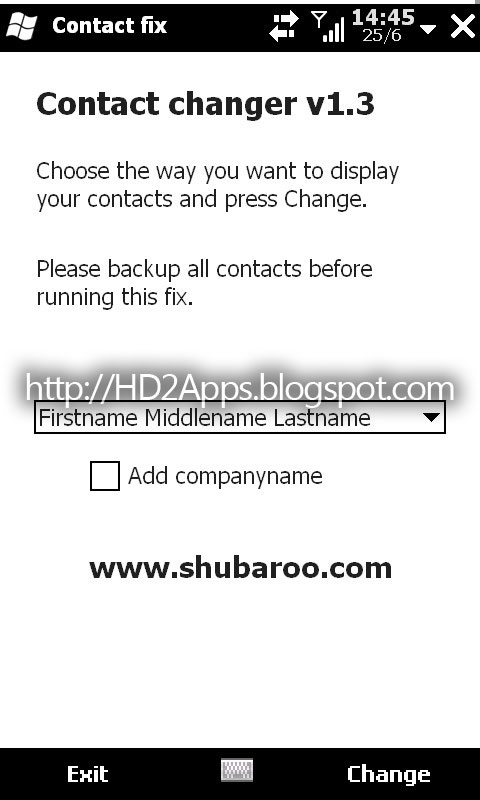
    HTC HD2 Apps: Shubaroo Contact Changer v1.3


    Choose the way you want to display your contacts.

    Are you changing all your contacts one by one to make them appear as "Firstname Lastname" in the contacts application? Then Contact changer will help you! It will make your life easier by changing all your contacts in one operation. You start the application, select the way you want to sort your contacts and press Change. You can also add the company name to the display name.

    Download This HD2 App Here:


    Talk about it on our Facebook page.
    Sharing Matrix
    zip file: 1.15MB

    Rapid Share
    zip file: 5.90MB

    Monday, June 21, 2010

    HTC HD2 Apps: Endkey Long Press Replacement


    This little app will replace your Long-press end key menu and add a few features to it.

    Added Features:
    - Soft Reset
    - Restart Sense
    - Comm Manager
    - Enter Bootloader

    The "Lock Device" feature was removed.


    More Information about this app can be found here:
    http://forum.xda-developers.com/showthread.php?t=704631


    Download This HD2 App Here:


    Talk about it on our Facebook page.
    Sharing Matrix

    Rapid Share

    Sunday, June 6, 2010

    HTC HD2 Apps: SciLor's Leo Camera Any Key v2.5


    One of the major setbacks of our beloved HD2 is that is has no camera hardware button.
    Not any more !!! This little hack turns the volume buttons to hardware camera buttons.
    No more clicking on the screen to take pictures or record videos. one click on the volume up/down button and that is it !
    This new version adds the ZOOMING option! just click and hold to zoom in and do it again to zoom out.
    * To enable the zooming option open the config file.

    How to install:
    this download contains two cab files.
    1. install the first one called: "SciLorsLeoCameraAnyKeyv2.5.CAB"
    2. Soft Reset Your device.
    3. this file will give you 4 new icons on the start menu . One is for taking photos, one is for videos, one is for last mode opened (photo or video) and the last one is "config".
    TO USE YOUR NEW CAMERA BUTTON YOU MUST USE THESE ICONS!
    the old camera shortcut will still work, but you don't need it anymore!
    4. After you install the first file check to see if it works on your camera version.
    5. install the second file called: "LEO Camera 6_26_20121425.cab" ONLY if its not working.
    This second file will upgrade your camera version to 6.26 Build 2012.1425


    * This is not compatible with all roms. Try this on your own risk.


    More Information about this app can be found here:
    http://forum.xda-developers.com/showthread.php?t=693433

     
    Download This HD2 App Here:


    Talk about it on our Facebook page.
    Sharing Matrix

    Rapid Share

    Tuesday, May 25, 2010

    HTC HD2 Apps: LeoCpuSpeed v3


    LeoCpuSpeed v3, control cpu speed & overclock

    Features
    - Updates CPU speed every half second
    - Can stress the CPU to show you that it goes up to 998mhz under load
    - Disable autoscaling so that you can control the speed yourself
    - Select the speed you want by moving the slider or pressing 768/998 presets
    - Automatically disable autoscaling and set speed at boot (via menu)
    - Overclocking

    Notes on auto-apply speed at startup
    1) Disable autoscaling
    2) Select the cpu speed you want
    3) Menu > Apply speed at boot

    Notes on overclocking
    1) Obviously overclocking is completely at your own risk, as you could harm your device. Luckily, in most cases, your device will just lock up and you'll need to restart your device (remove battery, re-insert and turn on again).
    2) The green buttons were the overclock settings that have been succesful 9 out of 10 times. The orange speeds have been succesful like 5 out of 10 times. The red speeds have never worked for me yet.
    3) The higher the speed, the more unstable. This is mainly because I don't have a way to increase voltage of the core.
    4) Overclocking only works on AC power! When on battery power, the overclock will work but will be undone within 500 milliseconds by the OS. Something within the OS, or a driver, or the radio rom, enforces the proper CPU speed every 500ms. 

    Try playing a decent movie in TCPMP or coreplayer with autoscaling on, and try again with autoscaling off and at 998mhz. Huge difference. (Note that some ROMs already have autoscaling disabled and will run at 998MHz all the time, like CleanEX. You won't notice a difference there obviously.)

    More Information about this app can be found here:
    http://forum.xda-developers.com/showthread.php?t=682663
       
    Download This HD2 App Here:

    Talk about it on our Facebook page.
    Sharing Matrix

    Rapid Share

    HTC HD2 Apps: IMAG to Date v2.5


    IMAG to Date Customizes Filenames of Media Files on Windows Mobile Devices

    IMAG to Date is a full service utility that allows you to rename a bunch of media files (pictures and videos) into new names accompanied by date and event.

    IMAG to Date renames image files, JPG, GIF, and BMP to Date Formatted filenames, MMddyyyyHHmm_RID (R.I.D. Random ID).
    The dates are based on the Date when the file is created.

    You’ll probably hate the way Camera application saves the image file, which was “IMAG####.jpg”. This kind of naming will cause a problem when backing up the image files in your PC/MAC specially when the file already exists in your backup drive but different picture, the only thing you could do is to rename the file in your mobile device. For example, you have “IMAG0050.jpg” in your mobile phone and you want to move that in your PC/MAC but a file “IMAG0050.jpg” already exists but has different picture? Probably the first thing you’ll do is to rename “IMAG0050.jpg” in your mobile device into something different.

    Now to make things easier, IMAG to Date is created to solve that problem.
     
    More Information about this app can be found here:
    http://forum.xda-developers.com/showthread.php?t=555607
     
    Requirements:Microsoft .NET CF 3.5
     
    Download This HD2 App Here:

    Talk about it on our Facebook page.
    Sharing Matrix

    Rapid Share

    Top 5 Posts of The Week: